High Risk Merchant Account For Hostinger
An Overview
Get a High Risk Merchant Account That Seamlessly Integrates with Hostinger
Hostinger is a powerful, affordable website builder and hosting platform trusted by millions of businesses worldwide. Out of the box, Hostinger integrates with only a handful of payment providers—which often don’t work with high-risk businesses.
That’s where Soar Payments comes in. We specialize in providing merchant services for high risk industries, and using our seamless integration with Hostinger, you can connect your Hostinger shopping cart directly to your Soar Payments high risk merchant account—using either the Drag-and-Drop Website Builder (Option A) or WordPress with WooCommerce (Option B – Recommended).
The result? A seamless checkout experience for your customers, backed by the underwriting and support your high risk business needs.

How To Integrate Your SoarPay Merchant Account with Hostinger
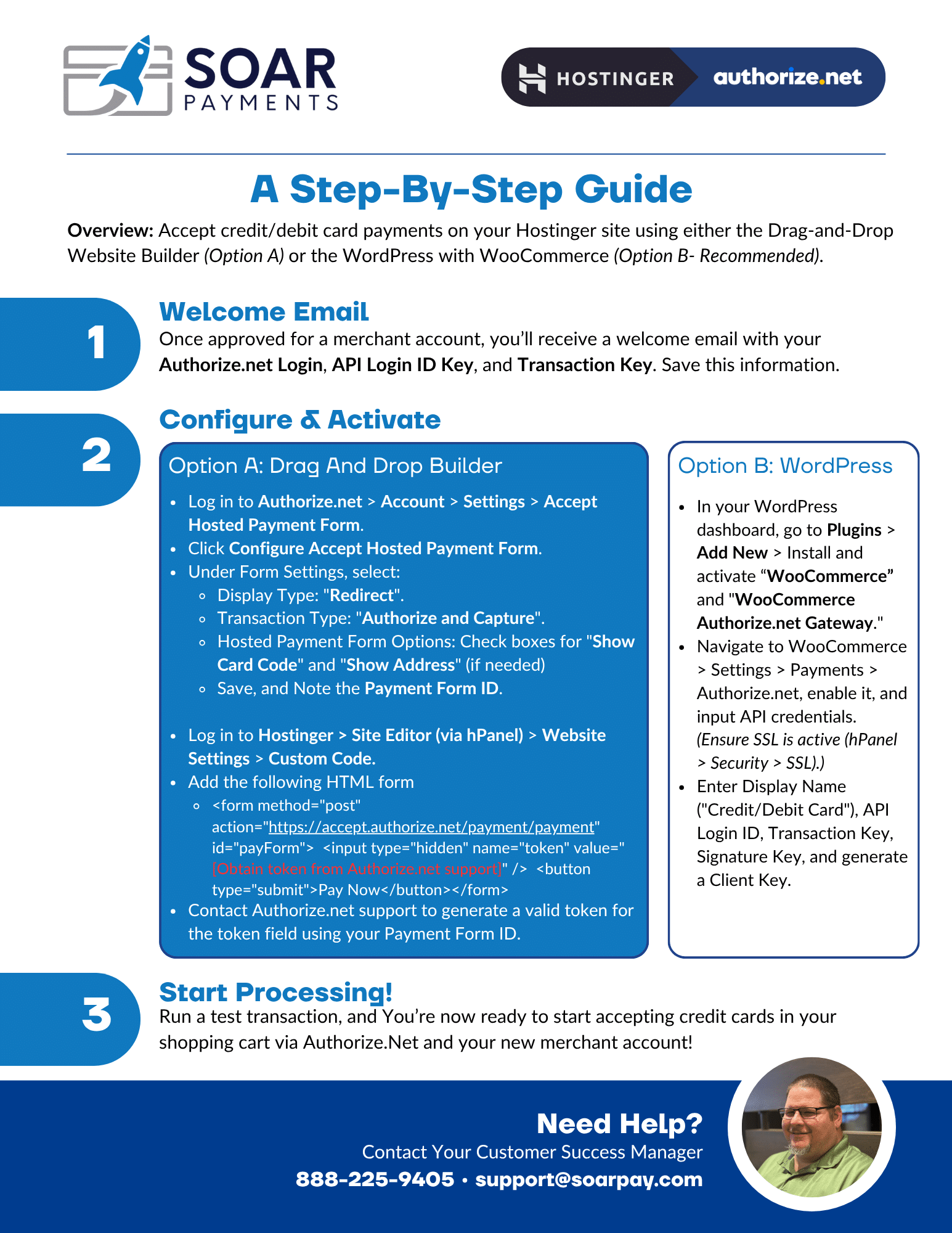
Overview: Follow these simple steps to connect your SoarPay high risk merchant account to your Hostinger site using either the Drag-and-Drop Website Builder (Option A) or WordPress with WooCommerce (Option B – Recommended) via Authorize.net. This setup allows you to securely accept customers’ credit/debit card payments and start processing immediately.
Step 1: Get Approved for a Soar Payments Merchant Account
Once approved, you’ll receive a Welcome Email containing your Authorize.net Login ID, Transaction Key, and Signature Key.
Step 2 – Option A: Drag And Drop Builder
- Log in to Authorize.net > Account > Settings > Accept Hosted Payment Form.
- Click Configure Accept Hosted Payment Form.
- Under Form Settings, select:
- Display Type: “Redirect”.
- Transaction Type: “Authorize and Capture”.
- Hosted Payment Form Options: Check box for “Show Card Code” and “Show Address” (if needed)
- Save, and Note the Payment Form ID.
- Log in to Hostinger > Site Editor (via hPanel) > Website Settings > Custom Code.
- Add the following HTML form:
- <form method=”post” action=”https://accept.authorize.net/payment/payment” id=”payForm”> <input type=”hidden” name=”token” value=”[Obtain token from Authorize.net support]” /> <button type=”submit”>Pay Now</button></form>
- Contact Authorize.net support to generate a valid token for the token field using your Payment Form ID.
Step 2 – Option B: WordPress (Recommended)
- In your WordPress dashboard, go to Plugins > Add New > Install and activate “WooCommerce” and “WooCommerce Authorize.net Gateway.”
- Navigate to WooCommerce > Settings > Payments > Authorize.net, enable it, and input API credentials. (Ensure SSL is active (hPanel > Security > SSL).)
- Enter Display Name (“Credit/Debit Card”), API Login ID, Transaction Key, Signature Key, and generate a Client Key.
Step 3: Start Processing
Run a quick test transaction to confirm everything is working. That’s it, you’re now ready to securely accept payments on your Hostinger site with Soar Payments + Authorize.net!

Why High Risk Businesses Choose SoarPay for Hostinger?
Here are just a few reasons why merchants in high risk industries choose Soar Payments as their Hostinger payment processing partner:
- High-Risk Friendly Unlike Hostinger’s default providers, we welcome high risk industries.
- Seamless Integration Our Hostinger integration via Authorize.net works with both Drag-and-Drop Builder and WordPress with WooCommerce, with no custom coding needed for the recommended option.
- Dedicated Support Our U.S.-based support team is always available by phone and email.
- Cost-Effective Solutions Benefit from transparent, competitive rates designed for high risk merchant services on Hostinger.
Together, a SoarPay High Risk Merchant Account and an Hostinger powered website provide high risk businesses with a great eCommerce platform for their customers.
Our friendly Customer Support Team is standing by to approve your application
Questions? (888) 225-9405
How Does The Application Process Work?
- Apply Online
Complete the online application process (it takes 5 minutes). Get Started - Get An Instant Quote
You’ll instantly receive a quote with Industry Minimum Pricing to DocuSign. - Start Accepting Payments
Our friendly, in-house client support team will help you get set up. We’ll make it fast and easy.

High Risk Merchant Accounts 101
High Risk Merchant Accounts 101 is the go-to podcast for business owners and industry professionals navigating the world of high-risk payments. Brought to you by the team at SoarPay, this show breaks down everything from credit card processing challenges to chargebacks, fraud prevention, and choosing the right merchant account provider. Whether you’re just getting started or looking to grow your business, we’re here to help you take control of your payments, reduce risk, and unlock new opportunities for success.